

Empower School Leaders, Safely
District leaders have asked for it, and we’ve built it. MagicSchool now supports a new Site Admin role designed specifically for school-level leaders like principals and tech coordinators.
If your organization is set up with SSO and sharing site-level data through Edlink, you can now assign school leaders admin access to their site(s)—no need to grant them full Org Admin rights.
What Site Admins Can Do
Site Admins get access to key tools that help them lead their school’s implementation:
📊 View reporting for their school or site
🧑🏫 Manage users at their site
🗂 Manage Rooms and organization at the school level
It’s the visibility and control they need to personalize how MagicSchool works for their team—without compromising district-wide settings.
Who Can Be a Site Admin?
Anyone already mapped to a site via Edlink data can be upgraded to a Site Admin by the Org Admin. Site Admins cannot be manually assigned to sites—they must be pre-mapped through your SSO data sync.
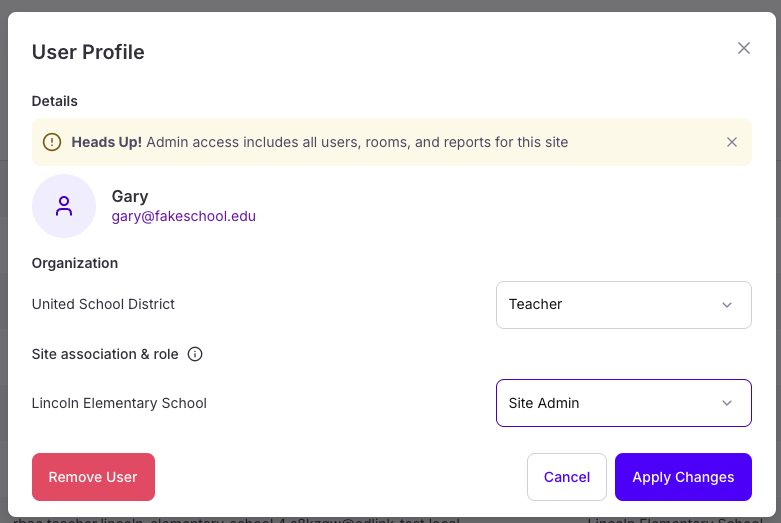
How to Assign a Site Admin
- Go to your Admin Dashboard
- Find the user already mapped to a site
- Click "Assign Site Admin Role"
- Choose the relevant site(s)
🔒 Note: Only Org Admins can assign Site Admin roles.
Reach out to your Customer Success Manager for help setting this up.
Coming Soon
We’re already working on fast follows—like site-level tool access and moderation settings—so your school leaders can do even more. Stay tuned.